Handmade Halloween Ideas
10 tricks and treats for inexpensive and easy DIY photo and printing fun
Home & Home Office
Support & Drivers
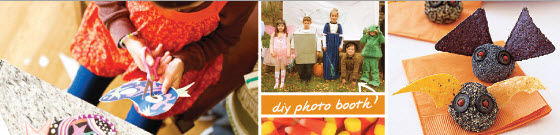
Introduction
You know what’s really scary? Spending a ton of money on Halloween decorations, costumes, and activities that you could make yourself! Here are 10 tips for creating inexpensive and memorable fun—whether you’re throwing a bone-chilling Halloween bash or spending the evening at home watching spooky movies and enjoying treats with your family.
Free Download: Handmade Halloween Book
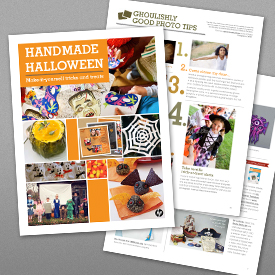
Get photo tips, recipes, crafting tutorials, and everything else you need to create memorable—and affordable—Halloween fun.
Want even more easy ideas for handmade tricks and treats? Download our 12-page Handmade Halloween book filled with how-tos and tips.
You can print and enjoy it, or download a copy to your desktop for reference and inspiration.

1. Invitations that bewitch
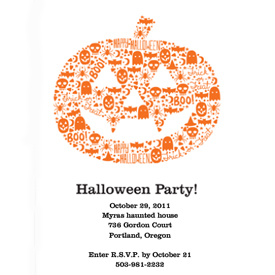
Create boo-tiful, boutique-quality greetings at home. Just type in your party details and print!
Our Halloween invitations are splendidly spooky and frighteningly easy to make. Choose a chilling card design from our gallery to create your own ghoulish party invitations.
You can print your Halloween greetings on HP Advanced Photo Paper, available in several sizes. This sturdy, glossy, and even water-resistant photo paper dries instantly for quick photo handling, passing around, and stacking.
2. DIY decorations and delightful frights
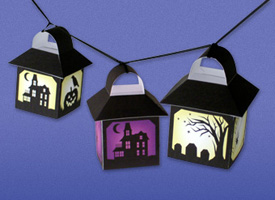
Cast a ghoulish gleam with Hair-Raising Lanterns.
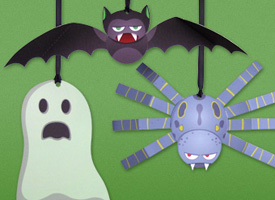
Hang these Floating Monsters from your home’s eaves or inside a window—anywhere you want a scare!
Turn your home into a haunted house using these spooky printable decorations from HP Creative Studio’s Halloween Shop.
- String Hair-Raising Lanterns in any space to create an instant Halloween atmosphere.
- Provide a little trick for treat-seeking guests with printable Floating Monsters hanging from your home’s eaves.
- Place a Spine-Tingling Skeleton Decoration on your front door to welcome—and spook—visitors.
Up the “Ewwww” factor and make creepy spider webs by shredding white panty hose.
Or make your own paper spider webs to use for décor, place settings, and family fun. (It’s similar to making paper snowflakes.) Get a complete step-by-step in our free Handmade Halloween book.
Before you begin printing decorations, be sure you have plenty of ink on hand. To save money, consider HP high-capacity (XL) ink cartridges, which allow you to save up to 40% on your printing.1
Get free next business day shipping with no minimum when you order from the HP Home & Home Office online store.
3. Eerily instant recipes
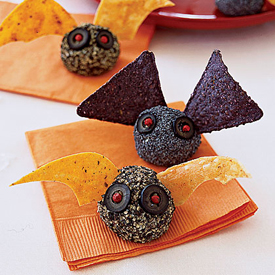
These fun appetizers will fly off the table.
Looking for finger food (or perhaps even some food shaped like fingers) for your Halloween celebration? The MyRecipes.com print app—available on HP Photosmart printers, such as the HP Photosmart 6520 e-All-in-One—contains recipes from Cooking Light, Real Simple, and other popular publications.2
You’ll find recipes like Bat Bites, which couldn’t be easier. Mash together cream cheese, goat cheese and pesto, shape into balls, and roll in pepper and/or poppy seeds. Use olives for bat eyes and tortilla chips for wings, and you’re done. (Download the Handmade Halloween book for full instructions and more recipes.)
SEE IT: Watch how HP Print Apps work in these videos.
4. Frightfully easy photo booth
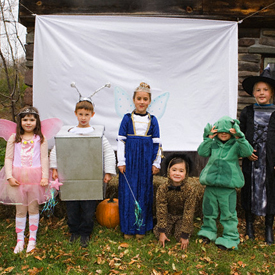
Ask people to pose in costume or with props, and send them home with instant photo memories of all the fun.
Photos make excellent party favors—and you can turn photo-taking into a game, too. Have your digital camera and a photo printer on hand. The backdrop can be as simple as a sheet. Then get people to pose in costume or with props, and send them home with instant photo memories of all the fun.
Some moments are too special to wait and share later! Instantly send photos of your little goblins to an HP ePrint-enabled printer, like the HP Photosmart 6520 e-All-in-One, using HP ePrint—now print from your smartphone or tablet from virtually anywhere.3 Check out the HP Photosmart buying guide to find a printer with ePrint.
SEE IT: Watch this video to see ePrint in action.
5. Pump up your pumpkin
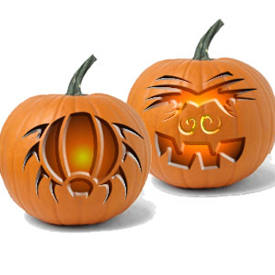
When printing things like masks or carving templates, try using thicker paper, like HP Brochure & Flyer Paper—it will make the templates easier to trace around and the masks more durable.
To take pumpkin pictures that really shine, you need to let the light through—and add extra wattage.
- Cut extra-large openings for eyes and big, jagged smiles.
- Use two or three candles inside the pumpkin.
- Try placing a small flashlight in the pumpkin.
These free pumpkin carving templates can help you create a variety of designs—ghosts, spiders, cats, and a gallery of faces both spooky and silly.
If your kiddos aren’t old enough to wield a carving knife, print the templates on heavy paper. Let the little ones glue or tape them to the pumpkin. Or turn it into a game and play a version of “Pin the Tail on the Donkey.” You’ll find a step-by-step in our Homemade Halloween PDF book.
6. Creep closer with your camera

Whether photographing costumes, decorations, parties or Halloween parades, fill the frame with your subject.
The simplest way to get better Halloween pictures: Fill the frame with your subject.
A vampire’s toothy smile, ghosts flapping their arms, or a panoramic expanse of orange pumpkins in a field could all make a great subject, but not all together. By doing this, you’ll avoid a common photography error: cluttered pictures with no discernable subject.
Halloween may only come once a year, but you can make your memories last much longer by using high-quality HP Premium Plus Photo Paper, which features exceptional fade resistance and produces vibrant, professional-quality photos that last for generations. Get tips for printing 4" x 6" and 5" x 7" photos.
7. Take terror-ific trick-or-treat shots

When taking your kids trick-or-treating, position yourself so that you can photograph them as they receive treats.
If you’re welcoming children to your door, work with a partner: Have one person open the door and greet the kids while the other snaps away.
And don’t let common photo problems like red-eye ruin your fantastic pictures. Get advice on removing red-eye and evaluating your photos before editing and discover which editing techniques can fix your photo flaws.
Find more general photo composition tips in our Homemade Halloween book and at the HP Digital photography center.
8. Create costumes in an instant
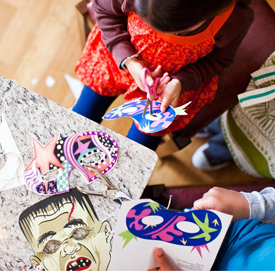
Need a last-minute costume for a party at the office or school? Nothing is easier than printing a mask.
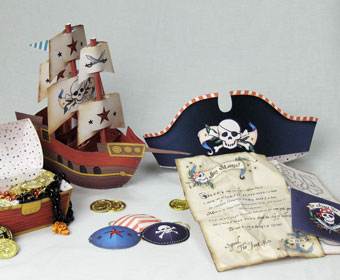
Avast ye, last-minute landlubbers! Make the Pirate Party Kit and craft your own pirate hat and eye patch.
You’ll find a variety of instant-print mask designs—including old-fashioned monsters, space aliens, and fanciful masquerade masks.
Or print the Pirate Party Kit and craft your own pirate hat and eye patch. Add a tattered white T-shirt, either cinched with a rope belt or topped with a black vest. Boots can complete the picture and are perfect for a chilly October night.
You can get printable decorations, masks, pumpkin carving templates, games, and activities—all from the Halloween Printables app on your Web-connected printer.
Print apps provide shortcuts to content, allowing users to print online materials without using a PC. You can print maps and directions, craft and coloring pages, photos from Snapfish.com, or even the latest news.
Learn more about Web-connected printing and HP Print Apps. Or, check out the HP Photosmart e-All-in-One buying guide to explore and compare Web-connected printers.
9. Scare up some fabric fun

Use your inkjet printer and HP Iron-on Transfers to create custom costumes.
Does your child want to be a fairy? Pair a flower wand from the Flower Fairy Party Kit with a Strawberry Fairy Iron-on for a magical ensemble.
Does your child long to be a 6’ NBA All-star? Use NBA Iron-ons to transform fans into their favorite team’s players. Add a basketball and some black sport shorts and you’re off.
Get more tips for printing on fabric.
10. Fangs for the memories: scrapbooks

You can relive the memories any time you want by archiving your favorite photos in a scrapbook! Learn more about using photos for scrapbooking.
Halloween is a perfect time for capturing once-a-year moments (especially of your little ones in their costumes) and sharing the photos with friends and family.
Visit the HP Creative Studio to find a Halloween Scrapbook, including pages, backgrounds, borders, photo corners, and stickers.
With a large-format printer like the HP Officejet 7500A Wide Format e-All-in-One, you aren't limited to 8.5" x 11" pages. You can print scrapbook pages on various paper types and sizes, including 12" x 12" and up to 13" x 19". Get more tips for printing 12" x 12" and 8" x 8" square scrapbook pages.
Explore the great printer patch
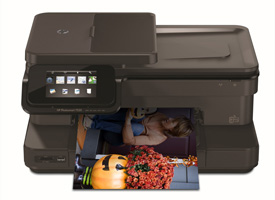
Print professional-quality photos at home with an HP Photosmart printer, such as the HP Photosmart 7520 e-All-in-One.
If you’re looking for a photo printer but frightened by all the options, check out the HP Photosmart buying guide.
You can compare and contrast and find a printer that allows you to print content directly from the Web without a PC using Print Apps.2 All HP Photosmart e-All-in-Ones also feature HP ePrint—now print from your smartphone or tablet from virtually anywhere.3
Get the right tools
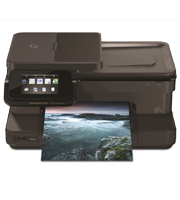
HP Photosmart 7520 e-All-in-One Printer
- Print, scan, copy, fax
- 4.3" color touchscreen
- Automatic photo tray holds up to 20 pages
- Lab-quality photos from 5 individual inks

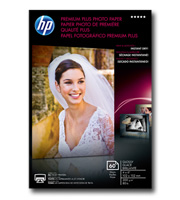
- Fade- and smudge-resistant
- Dries instantly for quick sharing
- Professional-quality photo paper for long-lasting prints
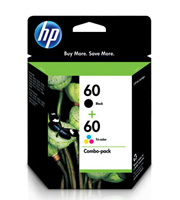
- Use Original HP XL Ink cartridges to save up to 40% on your printing 1
- Save up to 10% with HP ink multipacks 1
Not sure what supplies to get for your printer? Just enter your printer information, or the toner or ink you need, to find the specific supplies for your particular printer directly from the HP Home & Home Office online store!
Learn more
- Find unique ideas and inspiration to help you share photos and get creative.
- Encourage learning and fun at home by introducing your kids to digital photography.
- Find articles on editing and restoring photos.
- 1 Compared with single, standard HP ink cartridges. Based on average retail pricing, actual prices may vary.
- 2 Requires a wireless access point and an Internet connection to the printer. Services may require registration. App availability varies by country, language, and agreements. For details, visit hp.com/go/eprintcenter.
- 3 Requires an Internet connection to HP web-enabled printer and HP ePrint account registration (for a list of eligible printers, supported documents and image types and other HP ePrint details, see www.hp.com/go/eprintcenter). Mobile devices require Internet connection and email capability. May require wireless access point. Separately purchased data plans or usage fees may apply. Print times and connection speeds may vary.
In this article:
- Free Handmade Halloween Book ›
- 1. Invitations that bewitch ›
- 2. DIY decorations ›
- 3. Eerily instant recipes ›
- 4. Frightfully easy photo booth ›
- 5. Pump up your pumpkin ›
- 6. Get closer with your camera ›
- 7. Trick-or-treat shots ›
- 8. Create instant costumes ›
- 9. Scare up some fabric fun ›
- 10. Fangs for the memories ›
- Explore the great printer patch ›
- Get scary savings on ink ›
- Learn more ›