PC Learning Center
Explore
Support & Drivers

Introduction
Your laptop’s hard drive stores lots of valuable information, including your files, photos and music. HP ProtectSmart Hard Drive Protection—included with every HP laptop—acts like an airbag for your hard drive should you drop your laptop.
Look for this icon while shopping: |
 |
Product demo
 |
|
|||||
|
 (0:23)
 |

|
|
|
 |
||
|
|
|
How it works
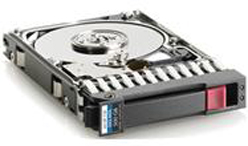
A simple, flexible interface reports hard-drive status and allows you to enable or disable the HP ProtectSmart Hard Drive feature. An LED light lets you know when the HP ProtectSmart has been activated.
Built-in HP ProtectSmart detects if your laptop has been dropped, and during that split-second journey to the floor, it automatically locks your fragile hard drive. This safety mechanism helps prevent the loss of your files and media library from damage caused by the fall.
Two levels of protection
The HP ProtectSmart Hard Drive Protection feature provides two levels of safeguards for your valuable personal information—without interrupting your day-to-day use.
- Normal protection
Anytime you’re working on your laptop, this level of protection is actively engaged, but remains unaffected by the normal vibration of airline flights, trains or other forms of transportation. - Enhanced protection
The enhanced level of protection features higher sensitivity. It’s enabled when risk is higher, such as when you’re carrying your laptop with the system on, lid closed and battery running.
HP understands how much you depend on the information saved on your hard drive. HP ProtectSmart Hard Drive Protection is built in, so you can rest easier knowing your valuable files are protected.